Commercial disclosure: Totti publishes this page and appears in the comparison. LittleCam did not sponsor it, and we receive no affiliate commission from its listing. We checked the official U.S. App Store pages on October 18, 2026. We did not install LittleCam or benchmark either product for output quality, speed, reliability, or ease of use. Competitor capabilities are presented as developer claims from the listing. All product names and trademarks belong to their respective owners; this comparison does not imply affiliation, sponsorship or endorsement.
Short answer: Choose Totti for AI-generated baby portrait scenes and coordinated virtual outfits. Choose LittleCam for a broader craft-style editor whose listing emphasizes background removal, automatic templates, milestone frames, seasonal themes, collages, stickers, text, and filters. The best fit depends on whether you want a new portrait concept or a composed milestone layout.
The distinction is not absolute: both listings describe themed baby imagery. The useful question is how much layout control and milestone decoration you need around the main subject.

What do Totti and LittleCam say they do?
| Area | Totti | LittleCam |
|---|---|---|
| Core approach | Generate styled portrait scenes from a baby photo | Remove the background and place a photo into templates and frames |
| Milestone tools | Newborn, weekly, monthly, yearly, and seasonal portrait concepts | Newborn, monthly, 100-day, first-birthday, weekly/monthly posters, and milestone trackers |
| Layout tools named | Portrait templates and virtual outfits | Collages, scrapbook layouts, frames, stickers, colorful text, and filters |
| Download offer | Free to download; in-app purchases | Free to download; in-app purchases |
| Source | Official listing | Official listing |
Compatibility checked October 18, 2026: Totti is listed for iPhone and requires iOS 17.0 or later. LittleCam supports iPhone and iPad and requires iOS 15.0 or later on iPhone or iPadOS 15.0 or later on iPad. Compatibility can change, so confirm the live listing on the device you plan to use.
Pricing caveat: The U.S. listings showed both apps as free to download with in-app purchases on October 18, 2026. LittleCam’s description referenced weekly or annual VIP subscriptions. We do not characterize either app as fully free because a free install does not define which templates, exports, or generations are included. Check live offer screens and renewal terms before confirming a purchase.
How was this comparison researched?
We used only the current official App Store listings for product claims. We recorded the stated workflow, named editing tools, supported milestone ideas, purchase indicator, and developer-reported privacy information. We then matched each capability to a real task: restage a portrait, replace a background, add a frame, build a first-year collage, label a milestone, or prepare a seasonal keepsake.
We did not use ratings as a score, quote customer reviews as general evidence, or repeat developer phrases such as “studio quality” as our finding. We also did not assume that face detection, background removal, generation, filters, or exports work perfectly in every photograph. Hair, blankets, fingers, transparent fabric, and low-contrast edges are difficult cases for many image-editing systems.
Is LittleCam a background changer or an AI portrait generator?
LittleCam’s listing describes an AI background remover that detects the baby, removes the existing background, and places the photo into automatic templates. It also lists milestone frames, seasonal designs, posters, collages, stickers, text, and filters. That suggests a compositing-and-decoration workflow where the captured subject can remain central while the surroundings and layout change.
Totti’s listing presents a more generative portrait concept: upload a source, choose from scene templates, and produce an AI-styled result with coordinated setting and outfit choices. That can change more of the image, which is helpful for an imaginative photoshoot but creates more details to verify against the original.
If preserving a particular expression or pose is crucial, test the least transformative route first. A simple cutout into a frame may be preferable to full generation. If a source has flyaway hair, a patterned blanket, or a hand touching the face, inspect the mask edge at full size. Our baby-background editing guide explains how to check halos, missing fingers, and unnatural floor contact.
Which app is better for a first-year collage?
LittleCam has the clearer documented fit. Its listing specifically describes a photo-collage creator for “My First Year” growth collages, memory books, scrapbook layouts, customizable frames, and poster styles. Totti can supply individual monthly portrait images, but its listing does not describe an equivalent multi-photo collage builder.
A strong workflow could use one consistent crop per month and a final collage only after all twelve source files are organized. Keep dates in filenames, not just inside the artwork. For layout ideas and a print checklist, see baby first-year photo collage ideas.
Where does LittleCam have the more directly documented fit?
LittleCam has the more directly documented fit for broad layout work. It names background removal, frames, milestone trackers, weekly and monthly posters, multi-photo collages, scrapbook layouts, stickers, text, filters, seasonal templates, and memory-book uses. Those tools cover more manual composition jobs than Totti’s focused portrait-generation description.
It also has the more directly documented fit when exact labels matter. A normal text tool is the safer place for a name, month number, birthday, or short caption because users can proofread the characters. Do not ask a generative model to render essential words inside an image and assume the spelling is correct.
Where does Totti have the clearer fit?
Totti has the clearer fit for someone who does not want to assemble a poster or choose individual decorative elements. Its documented path is theme-first: pick a portrait concept, create the new scene, and evaluate the result. Virtual outfit options also make sense when the desired keepsake is a coordinated portrait rather than a cutout placed inside a frame.
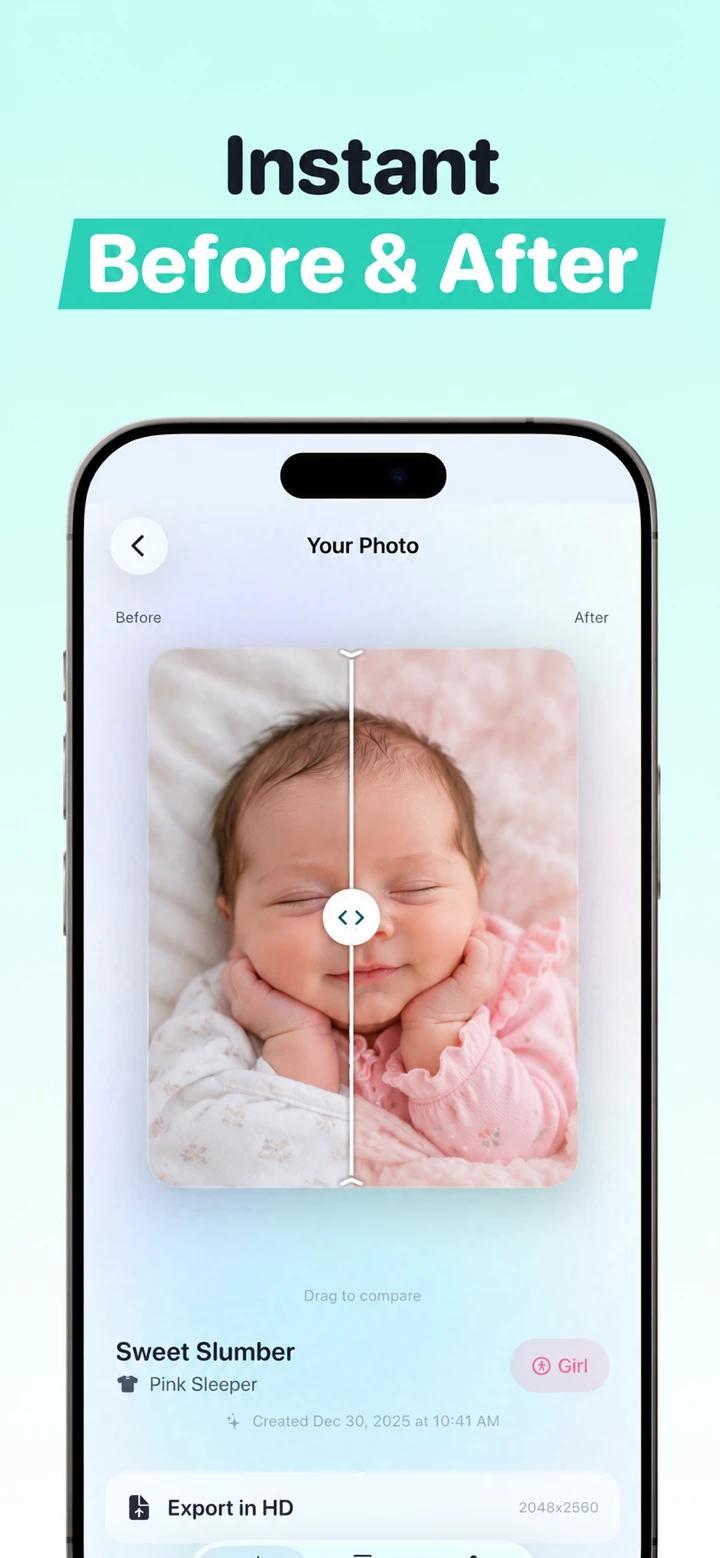
Use that comparison critically. Check whether the result changed eye spacing, ears, fingers, birthmarks, hairline, or the relationship between the face and blanket. A pleasing image can still be inaccurate. Keep only results you are comfortable labeling as a creative AI edit.
Which app is better for seasonal baby photos?
Both listings describe seasonal material. Totti names holiday themes and outfits; LittleCam names holiday frames and hundreds of templates, including Halloween, Christmas, Chinese New Year, Valentine’s Day, and Easter. The difference is again one of construction: a generated scene and wardrobe concept versus a template, frame, sticker, and text toolkit.
Choose LittleCam if you already like the subject and primarily need a festive border or background. Choose Totti if the new portrait setting is the main creative outcome. In either case, do not physically position a newborn in a prop arrangement merely to imitate a composite. Follow safe everyday handling and use editing for the fantasy.
What do the developer-reported privacy labels show?
Apple says App Privacy information is provided by developers and has not been verified by Apple. When checked on October 18, 2026, LittleCam’s label reported identifiers that may be used to track users, plus photos or videos, identifiers, product-interaction usage data and crash data listed as not linked to the user. Totti’s label reported “Data Not Collected.” These summaries are not our independent technical audit and may vary by feature or age.
Important Totti disclosure: The App Store label and Totti’s linked developer privacy policy do not currently align cleanly. The policy separately says baby photos and selected milestone text are processed by Replicate; profiles can include names, birth dates and milestones; optional Apple cloud backup can include profiles and images; and service-provider retention can extend beyond generation. Do not rely on the label alone. Review both live disclosures before uploading. This article does not determine which App Store privacy categories should apply.
Review the current privacy policy before choosing a source image. Look for photo-processing location, storage duration, deletion methods, vendors, analytics, and whether content may be used to improve services. Use only photographs you own or have permission to edit. Crop hospital labels, school logos, house numbers, and private documents before uploading.
How should a parent choose?
- Choose Totti for an AI-generated portrait series with themed scenes and virtual outfit concepts.
- Choose LittleCam for cutout-style background changes, milestone frames, first-year collages, scrapbook layouts, stickers, and text.
- Choose the least transformative edit when preserving the real expression, pose, or family setting matters.
- Keep the source and identify AI or composite results honestly when sharing.
Related head-to-head guides include Totti vs NewPic for two newborn AI tools, Totti vs Remini for creation versus enhancement, and Totti vs Baby Pics for another broad milestone editor. Our AI baby photo app roundup compares the category by job.

Try a theme-first baby portrait
Totti is free to download with optional in-app purchases. Begin with a clear photo you have permission to use, then compare the generated scene with the untouched source before exporting.
View Totti on the App Store