Commercial disclosure: Totti publishes this page and appears in the comparison. We receive no affiliate commission from the other apps. On October 18, 2026, we reviewed the current U.S. App Store listings for Baby Pics, Totsie, LittleCam, NewPic, Remini, Canva and Totti. We did not install or benchmark competitors, so we do not score performance, output quality or ease of use. All product names and trademarks belong to their respective owners; this comparison does not imply affiliation, sponsorship or endorsement.
Short answer: there is no single best Baby Pics alternative. Totti fits guided AI portrait restyling; Totsie fits stickers, text and a time capsule; LittleCam fits automatic background templates and frames; NewPic fits themed AI packs; Remini fits enhancement; and Canva fits flexible announcement layouts. Baby Pics itself remains strong for milestone artwork.

Which Baby Pics alternative matches which workflow?
| Workflow | Direct fit | Why it fits the declared listing |
|---|---|---|
| 1. Existing photo to a themed AI portrait | Totti | 50+ baby-specific portrait, outfit, seasonal and milestone templates |
| 2. Milestone artwork plus newer creative AI keepsakes | Baby Pics | 1,000+ illustrations, text, filters and listed PRO AI formats |
| 3. Stickers, custom text, collages and a time capsule | Totsie | Listing centers on those four functions |
| 4. Automatic background removal into milestone frames | LittleCam | Listing names AI background removal, auto templates, frames and collages |
| 5. Theme-pack AI newborn generation | NewPic | Listing describes 50+ AI newborn filters and one-photo generation |
| 6. Repairing blur or low resolution | Remini | Listing focuses on enhancing grainy, pixelated and damaged photos |
| 7. Exact announcement text and flexible social sizes | Canva | Listing centers on customizable designs, photo editing and collages |
Compatibility checked October 18, 2026: Totti is listed for iPhone with iOS 17.0 or later. Baby Pics and Totsie support iPhone and iPad with iOS/iPadOS 26.0 or later. LittleCam supports iPhone and iPad with iOS/iPadOS 15.0 or later. NewPic requires iOS 15.1 or later. Remini, Canva and Picsart require iOS 15.0 or later; Canva and Picsart are also listed for iPad. Confirm each live listing because device support can change.
All seven listings showed free download with in-app purchases when checked. That wording does not mean every generation, asset, export or tool is free. Offers and regional terms can change, so inspect the in-app purchase screen before uploading photos or starting a trial.
How were these alternatives selected?
We did not rank apps by popularity, star rating or the number of features. Instead, we asked what a person means when they search for a “Baby Pics alternative.” Some want a different milestone editor. Others want an AI portrait, a cleaner background, a sharper old photo or a designed announcement. Grouping all of those intentions into one leaderboard would hide the useful differences.
Each workflow assignment comes from the app's current developer-authored listing. We avoided unsupported claims such as “fastest,” “easiest,” “best quality” or “most private.” We did not reproduce marketing claims as proven outcomes. Where an app's stated focus directly matches a task, we call it a fit—not a guaranteed winner.
Baby Pics is the reference product, not a problem to escape. Its listing describes an established milestone workflow: choose or take a photo, add artwork, personalize text, apply filters and share. It also describes newer PRO AI formats such as animations, collectible themes, poster concepts, storybook scenes and coloring-book scenes. If those are exactly what you want, Baby Pics may remain the right choice.
Which alternative fits a guided AI newborn portrait?
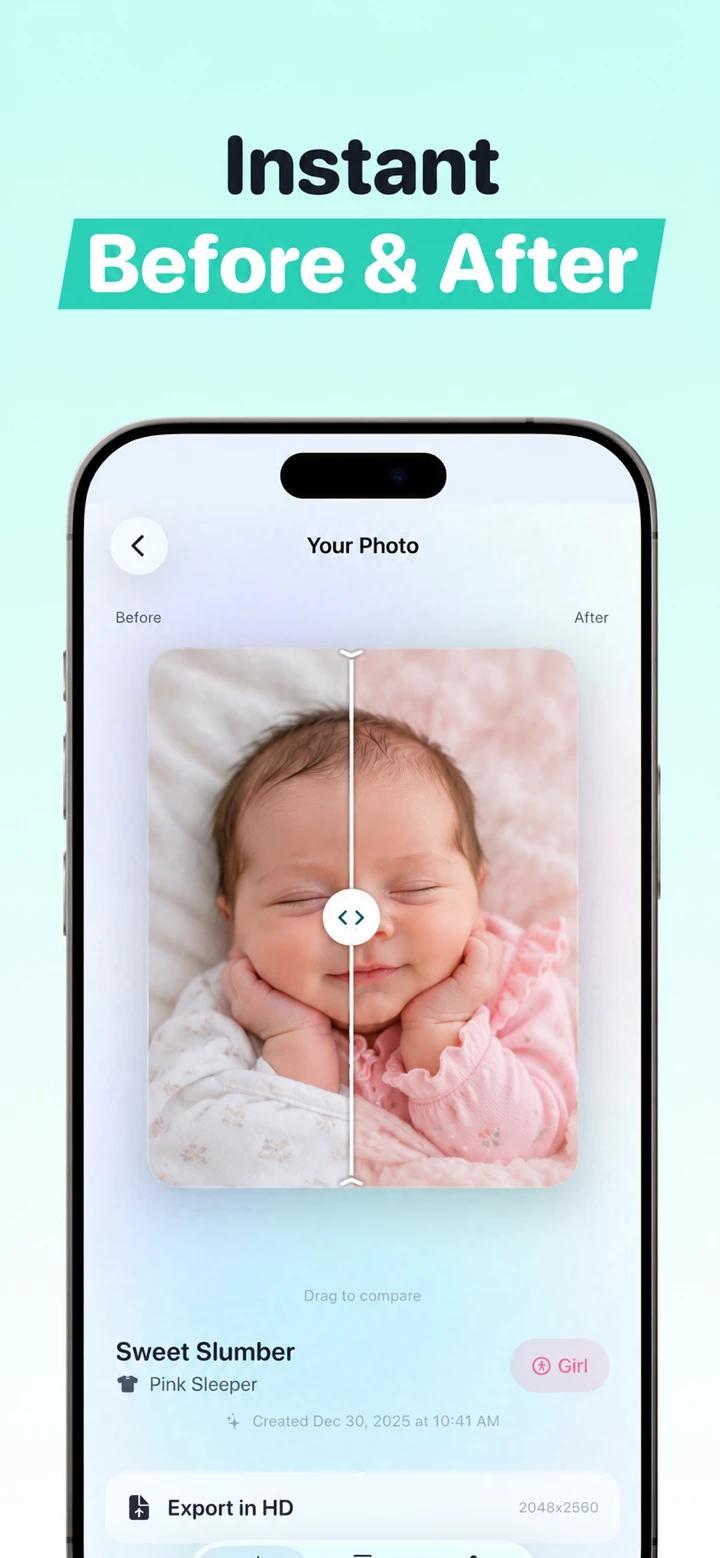
Totti is the direct alternative when the goal is to restyle a real baby's photo into a newborn, studio, seasonal, outfit or milestone portrait. Its listing describes 50+ templates rather than a sticker library or a blank design canvas. A current first-party interface screenshot shows a template-selection screen without a written prompt field at that step; it does not establish that every screen or future app version works without one. The observed workflow is: select an existing baby photo, choose a visual direction and review the generated output.
Totti has the more directly documented fit for this narrow case because it is specialized around the portrait. Baby Pics has the more directly documented fit when you would rather add milestone artwork and exact text to a mostly unchanged photograph. A parent's choice therefore depends on whether the desired change belongs inside the image or on top of it.
No AI generator can promise that every feature will remain unchanged. Compare eyes, nose, mouth, ears, hairline, skin marks, hands, feet, clothing edges, support and shadows. Keep the untouched source and reject a result that does not represent the baby well.
Which app fits milestone stickers, text and keepsakes?
Baby Pics itself remains a direct fit for broad milestone artwork. Its listing names 1,000+ handcrafted illustrations across dates, firsts, pregnancy, holidays, announcements, daily life and other categories, plus personalized text and filters. It has the more directly documented fit when the real photo should remain recognizable and the creative layer is a date, phrase or decorative element.
Totsie is the closest traditional alternative in this group. Its listing describes 1,000+ stickers, custom text, comparison collages, filters and a private time capsule. Choose it when you want a chronology of pregnancy or baby photos and value the collage or archive concept described by the developer. Baby Pics, rather than Totsie, may fit better if its named AI keepsake formats are the main attraction.
For either app, enter names, dates, ages and measurements as text you can proofread. Do not use an AI image generator to render factual typography. Preserve an unedited copy of every milestone image so a decorative layer never becomes the only surviving family record.
Which alternative fits backgrounds, frames and theme packs?
LittleCam fits the frame-first workflow. Its listing says AI can detect the baby's face, remove backgrounds and place the photo into templates. It also lists milestone frames, seasonal templates, stickers, text, filters and multi-photo collages. Choose it when the desired result is visibly frame-based or scrapbook-like and automatic cutout placement is central.
NewPic fits a theme-pack generation workflow. Its listing describes 50+ AI newborn filters, including costume and studio concepts, and says a user uploads one newborn photo and selects a pack. That places it closer to Totti than to Totsie or Canva. Totti offers a baby-specific template catalog; NewPic emphasizes its named theme packs. Without controlled testing, we cannot responsibly say which produces better results.
NewPic's listing also makes an on-device processing statement, while its App Privacy label says photos or videos may be collected and linked to identity for app functionality. Those two developer-provided statements deserve careful reading in context. A prospective user should consult the current privacy policy and request clarification if the processing path is unclear, rather than assuming either statement independently proves the architecture.
For background removal in any app, keep safety reality intact. Never erase an adult hand that is physically supporting a newborn. If the subject edge crosses hair, fingers or a supporting blanket, a simple crop may be more faithful than a generated replacement.
Which alternative fits a blurry or low-resolution baby photo?
Remini is the category match when the composition is already correct but the file is grainy, pixelated, damaged or low resolution. Those are the uses its current listing emphasizes. The listing centers on enhancement rather than newborn scene generation, milestone stickers or announcement design.
Enhancement is still generative inference. A tool cannot recover detail the camera never recorded; it can construct a plausible version. This is especially important around eyes, eyelashes, teeth, hair and skin texture. Keep the result as an interpretation, compare it with other frames from the same moment and avoid using invented detail for identification or official documents.
If the source is merely dark or warm, try conventional exposure and white-balance adjustments first. Our newborn photo editing guide for iPhone explains a non-generative sequence that may solve the problem without rebuilding facial detail.
Which alternative fits birth announcements and social layouts?
Canva fits when the main output is a designed card, collage, feed post or Story. Its listing describes a broad design platform with customizable templates, photo editing, background removal and collages. This is the strongest workflow here for exact typography and multiple export shapes.
Canva is not a baby-photo specialist. That is an advantage when you want flexible layout control and a disadvantage when you want a guided newborn portrait concept. Totti can create the portrait first; Canva can then place it into a layout. Our Totti versus Canva comparison documents that two-stage process.
Before publishing, verify every name, date, time and measurement against a trusted note. Remove optional template fields you do not want to disclose. A public announcement rarely needs the hospital name, exact location or every birth detail.
Can one app cover all seven workflows?
Several listings overlap, but overlap does not erase their center of gravity. Baby Pics now describes traditional artwork and AI keepsakes. LittleCam combines frames with automatic cutouts. Canva mixes conventional and AI design. The practical question is not whether an app can touch the task; it is whether its declared workflow makes that task easy to understand and review.
Using fewer apps can reduce uploads and subscriptions. Using a specialist can reduce irrelevant controls. A sensible process starts with the least transformative tool that completes the job. Conventional crop and light adjustments come before enhancement; enhancement comes before full scene generation; text and layout happen after the approved portrait.
What should parents learn from the current privacy labels?
Apple says App Privacy information is supplied by developers and has not been verified. Labels may also vary by feature or age. They should prompt questions, not produce a simplistic “most private” ranking.
- Totti: the developer reported “Data Not Collected.” This does not prove on-device processing.
- Baby Pics and Totsie: the labels reported identifiers used to track users, identifiers linked to identity, and diagnostics not linked to identity.
- LittleCam: the label reported identifiers used to track and user content, identifiers, usage data and diagnostics not linked to identity.
- NewPic: the label reported photos or videos collected and linked to identity for app functionality.
- Remini: the label reported identifiers used to track, contact information linked to identity, and photos or videos plus other categories not linked to identity.
- Canva: the label reported identifiers used to track and several linked categories, including financial information and user content.
Important Totti disclosure: The App Store label and Totti's linked developer privacy policy do not currently align cleanly. The policy separately says baby photos and selected milestone text are processed by Replicate; profiles can include names, birth dates and milestones; optional Apple cloud backup can include profiles and images; and service-provider retention can extend beyond generation. Do not rely on the label alone. Review both live disclosures before uploading. This article does not determine which App Store privacy categories should apply.
These summaries reflect the listings checked October 18, 2026; read the live label and privacy policy before uploading. Ask where images are processed, how long they are retained, whether they train models, which providers receive them and how deletion works. Our full privacy-label guide explains each term and its limits.

Need the guided AI portrait workflow?
Totti is free to download for iPhone and includes optional in-app purchases. Start with one existing baby photo, choose a portrait template and inspect the result against the original.
View Totti on the App StoreWhat is the bottom line?
Baby Pics is still a strong fit for milestone artwork and personalized text. Totti is the alternative for guided portrait restyling; Totsie for a traditional sticker-and-time-capsule workflow; LittleCam for automatic frame placement; NewPic for theme-pack generation; Remini for enhancement; and Canva for design. Decide what remains unfinished in your photo, then pick the narrowest workflow that completes it honestly.
