The best baby milestone photo app is the one that solves the part you will actually repeat. Totti creates styled portraits from an existing baby photo. Baby Pics adds milestone artwork and text. Canva and Adobe Express build layouts. FamilyAlbum shares privately with relatives. 1 Second Everyday makes a video diary. Day One keeps photos beside the story behind them.
Those are not interchangeable jobs, so this is not a single winner ranking. Start with the keepsake you want at the end of the year, then choose the simplest monthly workflow that produces it.
Ownership disclosure: This article is published by Totti, and Totti appears in the comparison. We receive no affiliate commission from competitor links. The information below comes from current U.S. App Store listings checked October 14, 2026. We did not install or run output-quality tests of the competing apps, so we compare stated workflows—not speed, reliability or image quality.
The seven-app shortlist
| App | Choose it for | What it makes |
|---|---|---|
| Totti | A recurring AI-styled portrait series | Studio, milestone and seasonal portraits from an existing baby photo |
| Baby Pics | Milestone artwork and exact text | Decorated photos for weeks, months, firsts and holidays |
| Canva | Flexible layouts and collages | Cards, grids, social sizes and first-year recaps |
| Adobe Express | Designed cards and mixed photo/video projects | Template-based graphics, collages and short videos |
| FamilyAlbum | Invited-family sharing | An organized family photo and video album |
| 1 Second Everyday | A moving first-year recap | A sequence of short daily or milestone video snippets |
| Day One | Photos plus the story behind them | Dated journal entries with photos, notes and memories |
All seven U.S. listings showed a free download with optional in-app purchases when checked. That does not mean every template, export, storage feature or generation is free. Prices, compatibility and included features can change; read the current product page and purchase screen before subscribing.
How we selected and compared them
We first separated milestone work into seven distinct outcomes: generated portrait, decorated photo, flexible layout, design-plus-video, invited sharing, daily video and written journal. We then chose one current iPhone listing that explicitly describes each job. We considered whether the listing explains its workflow, identifies optional purchases and provides an App Privacy section.
We did not use star ratings as a quality score. Apps with different ages, countries and numbers of reviews cannot be compared fairly by one average. We also did not repeat developer superlatives such as “best” or “number one” as our own findings.
1. Totti: for a recurring AI-styled portrait series
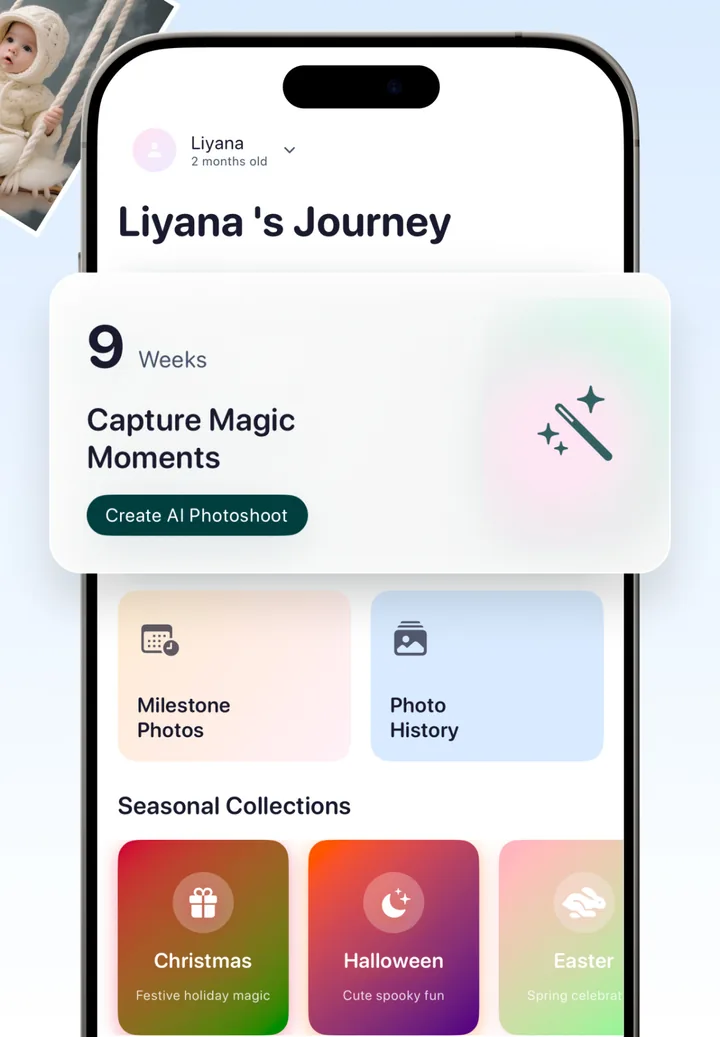
Totti's App Store listing describes an iPhone app that begins with a photo of a baby who already exists and applies portrait templates. The app's journey screen organizes milestone photos and photo history, which makes it relevant when the end goal is a visually consistent monthly series rather than a sticker on the original frame.
Choose it when: you want a new portrait setting from a clear phone photo and are willing to compare every result with the source.
Do not use it for: exact names, dates or long captions inside the image, documentary proof of a physical session, or official identification. Generative output can change facial and anatomical details.
The free Totti guide documents the current free path and the crown labels used for optional premium choices.
2. Baby Pics: for milestone artwork and personalized text
Baby Pics describes artwork for pregnancy, weeks, months, firsts, holidays and big-kid moments, plus personalized text and filters. It fits a parent who wants the original photo to remain recognizable while adding an age marker or short note.
Choose it when: the milestone label is the main job. Verify every name, date and measurement before saving, and avoid posting private birth details publicly.
3. Canva: for flexible milestone layouts and collages
Canva's listing describes photo editing, collages, templates, text and mobile formats. It is a general design app rather than a baby-specific tracker, but that flexibility is useful for a twelve-photo grid, first-year poster or matching square and Story versions.
Choose it when: you want to control typography, spacing and output size. Delete unused template fields instead of publishing a child's full name, location and measurements by default.
4. Adobe Express: for designed cards plus short video
Adobe Express presents templates, photo editing, text, collage and video tools. It suits families who want a coordinated monthly card and a short animated recap from the same visual system.
Choose it when: the final piece is a designed announcement or multi-format project. Use normal text layers for exact information; generative text is not a substitute for proofreading.
5. FamilyAlbum: for invited-family sharing
FamilyAlbum by MIXI describes a family photo album for organizing and sharing photos and videos with invited relatives. Its job is different from editing: it is where a family can follow the month-to-month story.
Choose it when: grandparents and relatives need one shared destination. “Private” still requires account hygiene—review invited members, remove old access and read the current privacy policy and backup terms.
6. 1 Second Everyday: for a moving first-year recap
1 Second Everyday describes a video diary built from short snippets, with journal and freestyle projects. A second of tummy time, a laugh or a wobbly first step can preserve change that a posed monthly still cannot.
Choose it when: motion and sound matter more than a decorated card. Keep the habit small enough to survive difficult weeks; one honest clip is more valuable than an elaborate setup you stop using.
7. Day One: for photos plus the story behind them
Day One describes dated journal entries with photos, notes, tags, reminders and export options. It is the strongest fit here when the photo is only half the memory and you also want to record a new sound, habit, joke or hard-won routine.
Choose it when: the end goal is a searchable family journal rather than public social content. Review current backup, encryption, export and subscription details on the listing and in the privacy policy.
Choose by the keepsake you want in twelve months
- Twelve coordinated portrait transformations: Totti.
- Twelve original photos with decorative age labels: Baby Pics.
- A first-year grid, poster or set of social formats: Canva.
- A designed card plus short motion project: Adobe Express.
- An invited album relatives can follow: FamilyAlbum.
- A one-second-a-day first-year film: 1 Second Everyday.
- A photo diary with the story behind each milestone: Day One.
You can also combine two tools: create one portrait, then archive it in a journal or private family album. Avoid running the same image through several AI tools in sequence; each generative pass can move it farther from the source.

Want the portrait workflow?
Free to download; optional in-app purchases. Start with a clear photo, choose a milestone or portrait template and compare the output with the original before saving.
View Totti on the App StorePrivacy questions for every milestone app
- Does the app upload photos, and where are they processed?
- How long are originals, edits and backups retained?
- Can uploads be used for product improvement or model training?
- Who can view a shared album, and can you revoke access?
- Can you export your archive and delete the account and files?
App Privacy labels are supplied by developers and Apple notes that the information is not independently verified. Recheck the current listing and privacy policy before uploading a child's photo. Our privacy guide provides a fuller checklist.
