Separate portraits are the lowest-complexity way to make baby and pet photos. If both subjects appear in one physical scene, maintain real distance or a secure barrier and assign one alert adult to the baby, another to the pet and a third person to the camera. Supervision lowers risk but cannot make close contact predictable.
The separate-frame rule also works before the baby arrives. In our pregnancy announcement photo ideas, the pet messenger is photographed alone beside a simple sign, without a forced interaction or unfamiliar costume.
Pets are real parts of family life and belong in the record, but a photograph is not a reason to arrange an interaction. This article is a photography workflow, not veterinary or animal-behavior advice. If you have any concern about an animal's behavior around a baby, keep them separated and consult your veterinarian or a qualified behavior professional before planning a shared scene.
The distance-first rules
- Never leave a baby and pet together unsupervised. For a photo, supervision must stay focused rather than split between the animal, baby and screen.
- Use dedicated roles. In a shared scene, one adult is responsible only for the baby, one only for the pet and a third takes the photo. With fewer adults, photograph them separately.
- Do not prompt contact. No paw or head on the baby, touching hands, face-to-face pose, shared blanket, shared furniture or animal inside the baby's sleep space.
- Keep food, toys and photo props out of the scene. Do not use an item to direct the animal closer to the baby.
- Avoid raised and padded posing surfaces. Do not use beds, sofas, tables, beanbags, baskets or bouncers as a joint photo set.
Do the usual newborn safety rules still apply?
Yes. Read our newborn photography safety post as the baseline. The newborn photo poses guide explains why propped, wrapped, suspended and container setups should not be attempted at home. Do not add an animal to any newborn posing setup.
The practical version is that a pet session needs one more adult than a solo newborn session does. The spotter stays with the baby, the handler stays with the animal, and the person holding the phone is a third pair of hands that is not responsible for either of them. If you only have two adults on the day, shoot the pet and the baby in separate frames and put them side by side later.
How do you set up a distance-first photo?
Do not use the photo session to introduce or train the pet around the baby. Keep the workflow visually simple:
- Photograph the baby and pet separately first. Separate frames can be presented side by side without arranging an interaction.
- Use the pet's normal management routine. A handler may use a familiar leash, gate or crate only as they normally would; this article does not provide training instructions.
- Keep the baby in an ordinary supported hold or appropriate space. Do not place the baby on a blanket for the pet to approach.
- Start and remain at a clear distance. Do not close the gap for the composition; change camera position or crop instead.
- Stop at uncertainty. If any adult is unsure about either subject, separate them and end the shared scene.
A shot list that works with real animals
| Shot | How to set it up | Safety note |
|---|---|---|
| Matched separate portraits | Photograph each subject against the same wall or in similar light, at different times | No shared physical scene required |
| Two-panel scale study | Make one close-up of the baby's hand and a separate close-up of the pet's paw | Combine only in the layout |
| Room-wide family frame | Baby held by one adult; pet remains with its dedicated handler at a clear distance | Third adult takes the photo |
| Barrier-in-frame story | Use a normal secure gate or other established separation already used in the home | Do not remove the barrier for a cleaner shot |
| Pet alone near family gear | Photograph the pet beside an empty stroller or outside the nursery | Baby remains elsewhere with a caregiver |
| Digital collage | Pair a baby portrait with a pet portrait in a card or photo book | Review edits for inaccurate details |
Which props should stay out of a shared scene?
Keep containers, loose fabric, lights, cords, heat sources and small objects out of the baby's space. Do not use a prop to hold either subject in position or entice the animal closer. The diagram summarizes the no-pose home baseline.
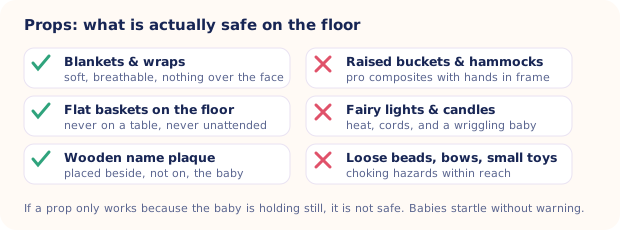
Our post on newborn photography props explains why the conservative at-home choice is ordinary fitted clothing, a simple background outside reach and no physical posing props.
What uncertainty means stop?
Do not use a generic online body-language checklist to decide that a pet is comfortable near a baby. If the animal moves toward the baby, tries to leave, becomes still, vocalizes or behaves in any way that concerns an adult, create distance and end the shared scene. Do not punish or test the behavior for a photograph.
If you are unsure how to interpret a specific pet's behavior, keep the animal and baby separated and ask your veterinarian or a qualified behavior professional before arranging another shared session.
When should you end the session?
End the shared scene at the first sign of uncertainty from any adult, or whenever the baby or animal needs space. Do not wait for a second signal or try for one more frame.
Ending early costs nothing. A matched pair of separate portraits remains a complete result.
Do not wait for a second concern or one more frame. Separate the subjects as soon as any adult is uncertain about the scene.
Short sessions and clean endings
A few minutes is enough. Keep any pet handling within the animal's established routine and leave food, toys and training exercises out of the baby photo area.
- Photograph separately first. Once you have two solo portraits, a shared physical scene is unnecessary.
- Keep the distance fixed. Do not move either subject closer for the next frame.
- Use a quiet camera setup. Avoid flash, noises or actions intended to startle either subject into looking at the lens.
- Keep the baby caregiver off camera duty. Their attention stays on the baby throughout the shared scene.
- End without another attempt. When any person is unsure, separate the subjects and put the camera away.
Lighting baby and pet photos when the fur is dark
Soft window light can preserve detail in dark fur. Expose for the pet in its separate portrait, then make the baby's portrait separately with the same background. Avoid attention noises or any attempt to direct the animal toward the baby.

When separate portraits work better
A clear photo of the baby alone can become a studio-style portrait or milestone card, while the pet's separate portrait completes the layout. AI can alter details, so compare outputs with their sources. 50+ templates, HD export, free to download on iPhone.
Get Totti on the App StoreThe frame you will actually keep
The photo many families value is not a staged interaction. It may be a wide documentary frame with the baby in an adult's arms and the pet behind its usual barrier, or two ordinary moments paired later. Keep taking everyday photos, but never trade distance or focused supervision for a composition.
