Removing information from a photograph usually makes it worse. Color is the exception, often enough that black and white baby photos have their own shelf in every family album, and the reason has nothing to do with looking arty.
Mono is a repair tool with a specific job list. Used on the right frame it rescues a photo you were about to delete. Used on every frame it turns a year of memories into a flat gray blur.
What does black and white actually fix?
Four problems account for nearly every conversion worth making. The first two are about the baby and the light falling on them, and no amount of sliding the color controls will properly solve either.
- Blotchy newborn skin. The first weeks bring red patches, milia, mottled arms, peeling, and a yellowish cast that no white balance slider can talk its way out of. All of that is a color problem. Drop the color and it reads as texture instead of a rash.
- Mixed or ugly light. A warm lamp on one side and cool daylight on the other gives you a face that is orange on the left and blue on the right, which is one of the hardest things to correct in color. In mono the mismatch simply stops existing.
Does mono fix a messy background or clashing outfits?
- A cluttered, colorful background. A red muslin on the sofa, a bright plastic toy in the corner, a green throw. The eye goes to the loudest color in a frame before it goes to the face. Convert, and the face wins by default.
- Mismatched outfits. Family and sibling shots where one person turned up in navy stripes and another in mustard. Converting is faster than restyling everyone, and far faster than a reshoot.
Every one of those is a problem caused by color rather than by the photo itself. Fixing the light in the first place is still better, and our newborn photography lighting guide shows how one window solves most of it. Mono is what you reach for when the light has already happened.
What it costs you
Conversion is not free. Some photos exist because of their color, and turning them gray deletes the thing they were about.
- The specific pink of the nursery wall you spent two weekends painting. In mono it becomes a mid-gray wall, the same mid-gray as everyone else's.
- Seasonal cues. Autumn leaves, Christmas red and green, Easter pastels, a blue hospital blanket. Those colors are the date stamp on the memory, and holiday card photos in particular tend to lose their whole identity in mono.
- Personal color. Red hair, blue eyes, the exact shade of a first birthday cake smeared across a face. If someone would describe the photo using a color word, keep the color.
Convert a duplicate, never the original. Every good black and white frame deserves a color copy sitting behind it, because the version you prefer at three weeks is rarely the version you want at three years.
How do you tell if a photo will convert well?
Mono lives on contrast, on texture, on shape. Color interest counts for nothing. Squint at the photo until the details blur, then look for three things:
- A bright side and a shadow side. Side light from a window gives you both. Flat, even light from the front gives you neither, and a flat photo converts into a flat gray photo.
- Texture worth seeing. A knitted blanket, wispy hair against the light, the folds of a newborn's wrist, eyelashes on a cheek. Texture is what mono has instead of color.
- A shape that reads at a glance. A curled body, a profile, a hand around a finger. If you cannot tell what the photo is about with your eyes half shut, converting will not save it.
If the first word you would use to describe the photo is a color, leave it alone.
Posed frames and documentary frames convert differently
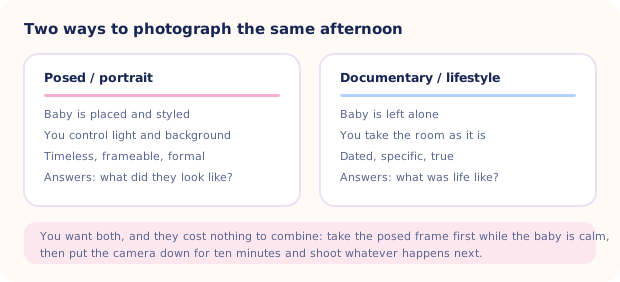
The two ways of shooting an afternoon, compared in the diagram below, respond to mono for opposite reasons. Posed portraits are already controlled. You picked the light, the blanket, the background, so converting adds formality and pushes attention onto the face and the form of the body. Documentary frames are the opposite. You took the room as it was, which means a radiator, a laundry pile and four competing colors came along for the ride, and mono is what quiets all of it down so the moment survives the mess.
| What's wrong with the color version | Convert? | Note |
|---|---|---|
| Red, blotchy or jaundiced newborn skin | Yes | The single strongest use for mono |
| Half the face warm, half cool | Yes | Faster and cleaner than any color fix |
| Bright clutter behind the baby | Usually | Crop first, then convert what's left |
| Clashing outfits in a family shot | Yes | Cheaper than restyling everyone |
| Flat, even, frontal light | No | No contrast to work with, it will go gray |
| The nursery, the leaves, the cake | No | The color is the point of the picture |
| Blurry or badly focused | No | Mono makes soft focus more obvious, not less |
How do you convert black and white baby photos on a phone?
The one-tap filter is fine for a story post. For anything you plan to print, spend the extra forty seconds:
- Duplicate the photo first. On iPhone, use Duplicate from the share sheet so the color original stays intact.
- Fix exposure before you convert. Get the face bright enough while the highlights on the forehead and cheek still hold detail. Blown-out white patches look far worse without color to disguise them.
- Apply the mono filter. Mono is the neutral one. Silvertone leans warm and Noir crushes the shadows hard (Noir is the one everybody over-uses), which suits older babies with strong features more than newborns.
- Add contrast in small amounts. A little separates the baby from the background. Too much turns skin into paper and eats the texture you converted for in the first place.
- Check the eyes last. They should still hold detail rather than sitting as two black dots. If they have gone solid, back the contrast off until they return.
Skip heavy grain and skip vignettes. Both read as a filter rather than a photograph, and both age badly. More on the general workflow in baby photo editing basics.
One wall, one voice
Mono has a second job. Photos taken across a year come from a dozen rooms and a dozen light temperatures, so hanging them together produces visual noise. One frame warm and yellow, the next cool and blue, the third with a red blanket shouting from the corner.
Convert the whole set and they become a series. Same tones, same weight, one voice across the wall. It works particularly well for a stair wall or a nursery display where the frames already match. Print at 300 DPI, and consider heavier paper, since mono shows banding on thin glossy stock more readily than color does. Printing baby photos covers sizes and finishes.

Fix the light instead of hiding it
If you are converting to mono mainly to cover bad lighting or a messy room, there is another route. Totti takes one clear photo and regenerates the background, lighting and styling across 50+ templates while aiming to keep your baby recognizable. Review the result against the source, and keep the original color version too. Export in HD at 2048×2560, add a Polaroid or wood frame, and convert afterwards if you still prefer it. Free to download on iPhone.
Get Totti on the App StoreTo finish, convert the photos that have a problem color can't solve and leave the rest alone. A family album that is entirely black and white looks like a decision. One with six mono frames scattered through it looks like a family that had a few very good days and knew what to do with them.
