Who exactly is this for? Answer that before a photo of your baby goes anywhere. Not "friends and family" as a warm general feeling, but an actual list of people you could name out loud.
Almost every regret about sharing baby photos online starts with skipping that question. The picture was lovely. The audience was three hundred people you last spoke to in 2014, plus everyone they decided to show.
Three audiences, three different decisions
The word "sharing" covers acts that have almost nothing in common. Sort them before you post anything.
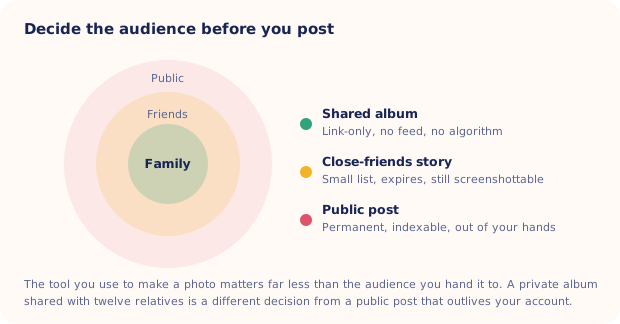
- Family. Ten to forty people you could list from memory. They want quantity, they will look at all of it, and they never need an algorithm to find it.
- Friends. Your follower list is not your friend list. It includes old colleagues, a landlord, someone's ex, and a few accounts you have never checked (at least one is a bot). Anything here is screenshottable and will travel further than you planned.
- Public. Anyone, forever, plus search engines, plus software that reads images at scale. A public post is a decision you make on behalf of a person who cannot yet object.
The rings in the diagram below match each audience to the tool that actually suits it, along with what you give up at each step outward.
What should you keep out of the frame and the caption?
Most of the risk sits in details nobody notices while posting. A caption plus a background can add up to more than either part on its own.
| What often gets posted | What it hands over | Safer version |
|---|---|---|
| Full name, exact birth date and hospital in one caption | Three of the fields used to verify an identity | First name or an initial, no hospital tag |
| The front of the house, door number, a street sign | Where your baby sleeps | Crop tight, or shoot indoors and in the back garden |
| A nursery logo on a bag, a school jumper | Where your child is on a weekday morning | Turn the bag around, crop the badge |
| Bath and diaper photos, bare bottoms | Images that get saved and reshared out of context | Wrapped in a towel, or from the shoulders up |
| Someone else's child in the background | A decision that was not yours to make | Ask the parents, or crop them out |
Are bath and diaper photos safe to post?
The bath and diaper line is the one people push back on, because the photos are innocent and often very sweet. Keep them. Print them. Put them in the family album. Just don't hand them to an audience you cannot count, and remember that your child will be fourteen one day with an opinion about what exists online.
The line most families settle on is that bare skin belongs in the album and not in the feed. If one of them is too good not to share more widely, a towel, a wrapped blanket or a shoulders-up crop keeps the whole moment and removes the part that gets saved and reposted by people you will never meet.
Do your baby photos show where you live?
Every phone photo carries metadata, including the time, the device, and usually GPS coordinates accurate to your driveway. The big social platforms strip that data when you upload, so a normal Instagram or Facebook post is not the leak. The gaps are elsewhere:
- Original files sent directly. Email attachments, AirDrop, cloud links and file transfers can all carry the coordinates through intact.
- Smaller sites and forums. Parenting boards, shops, print services and personal blogs vary wildly in what they strip.
- Manual tags. Adding a location yourself puts back exactly what the upload removed.
On an iPhone, tap Options at the top of the share sheet and switch Location off before you send. Do it once and check it again after big iOS updates. If you would rather not record it at all, turn off location access for the Camera app, though you lose the map view that makes it easy to organize years of baby photos later.
Albums beat feeds for the people who care most
Grandparents don't want a curated feed. They want everything, in order, whenever they like. A shared album gives them that and gives you a smaller blast radius.
- Shared photo albums. Invite by name, no algorithm, no reposting, easy to add fifty photos at once. Anyone invited can still save what they see, so keep the invite list tight.
- Link-only albums. Convenient for relatives without the right device or account. Treat the link like a house key that works for whoever holds it, and avoid posting it anywhere public.
- A private group chat. Underrated. Fastest to set up, easiest for older relatives, and the photos land in a place with no public surface at all.
- Close-friends lists and stories. Fine for a middle ground. Expiring is not the same as deleted, since a screenshot lasts as long as anyone wants it to.
Public is close enough to permanent
Assume anything posted publicly outlives the account that posted it. Deleting removes your copy, not the screenshots, the caches, the reshares or the copies pulled down by software that never asked.
This is not a reason to post nothing. It is a reason to decide once, deliberately, which photos are allowed to be public and to keep that set small. Announcement photos and milestone cards usually make the cut. Everything else can live in the album.
Written down, that set is almost always smaller than it felt. Two or three photos a year, chosen on purpose, is a perfectly normal answer, and it leaves you free to be generous everywhere the audience is a list of names.
How do you agree the rules with relatives?
The most common way a private baby photo becomes a public one is a proud grandparent, not a stranger. Say something before the birth, once, plainly, and give people somewhere else to put the pride:
"We're keeping her off public feeds for now. You'll get everything in the album, and you can look at it as often as you like. Please don't repost anything from there."
Two extra things that help. Ask for no face-on public posts rather than no posts, because a limited request gets followed and a total ban gets forgotten. And if someone posts anyway, message them privately and ask once. It is nearly always enthusiasm rather than defiance, and a friendly ask is enough. For the wider set of judgement calls around newborns, our newborn photography safety guide covers the physical side of the same instinct.
AI portraits follow the same rules
Generated portraits are still photos of your baby, so they get the same audience decision as any other frame. The extra question is what the app does with the photo you upload, meaning what it stores, for how long, and whether anything is used for training. We walk through what to ask in is AI baby photography safe, and the short version is that the tool you use matters far less than where you choose to post the result.

Studio-style portraits without a studio in the caption
Totti turns one clear phone photo into a styled portrait using 50+ templates and milestone cards, aiming to keep your baby recognizable while regenerating the background and lighting. No house number in the shot, no nursery logo, no hospital corridor. Export in HD (2048×2560) and share it with whoever you choose. Free to download on iPhone.
Get Totti on the App StoreWhat is the simplest rule for sharing baby photos online?
If only one thing survives this page, make it the question at the top. Naming the audience out loud takes about five seconds, and it is the only step in the whole process that cannot be repaired afterwards. Everything else here is downstream of it.
None of this needs to turn into a rulebook taped to the fridge. Pick the audience first, keep the address and the hospital out of the caption, send the good stuff to an album, and be a little boring about what goes public. If you are sharing arrival news, these private and public birth announcement wording examples show how the level of detail can change with the audience.
