For a clearer low-light iPhone baby photo without flash, move one soft lamp closer to the scene, use the 1× camera, tap the baby's face, lower the exposure slightly, and brace the phone against something solid. Use Night mode only when the baby is still enough to remain sharp for the full capture. When arms and expressions keep moving, add more room light and use Live Photos or Burst instead.
That choice between dark but still and dark and moving matters more than any hidden setting. Night mode can collect more light over time; it cannot ask a baby to pause halfway through.
Choose the method by how much the baby is moving
| What is happening | Best first move | Why |
|---|---|---|
| Baby is asleep or quietly held | Night mode, phone braced and held still | The longer capture can gather more detail |
| Baby is awake and making small expressions | Add room light and use Live Photos | You can choose a better key frame afterward |
| Baby is kicking or turning quickly | Add more light and use Burst | Several rapid frames improve the chance of one sharp expression |
| The room is very dark | Turn on a soft, shaded lamp or move toward a brighter doorway | No camera mode can freeze movement without enough light |
| The only lamp creates a bright orange face | Move it farther to the side and include neutral wall bounce | Softer indirect light reduces hotspots and extreme color |
Set up the light before touching camera controls
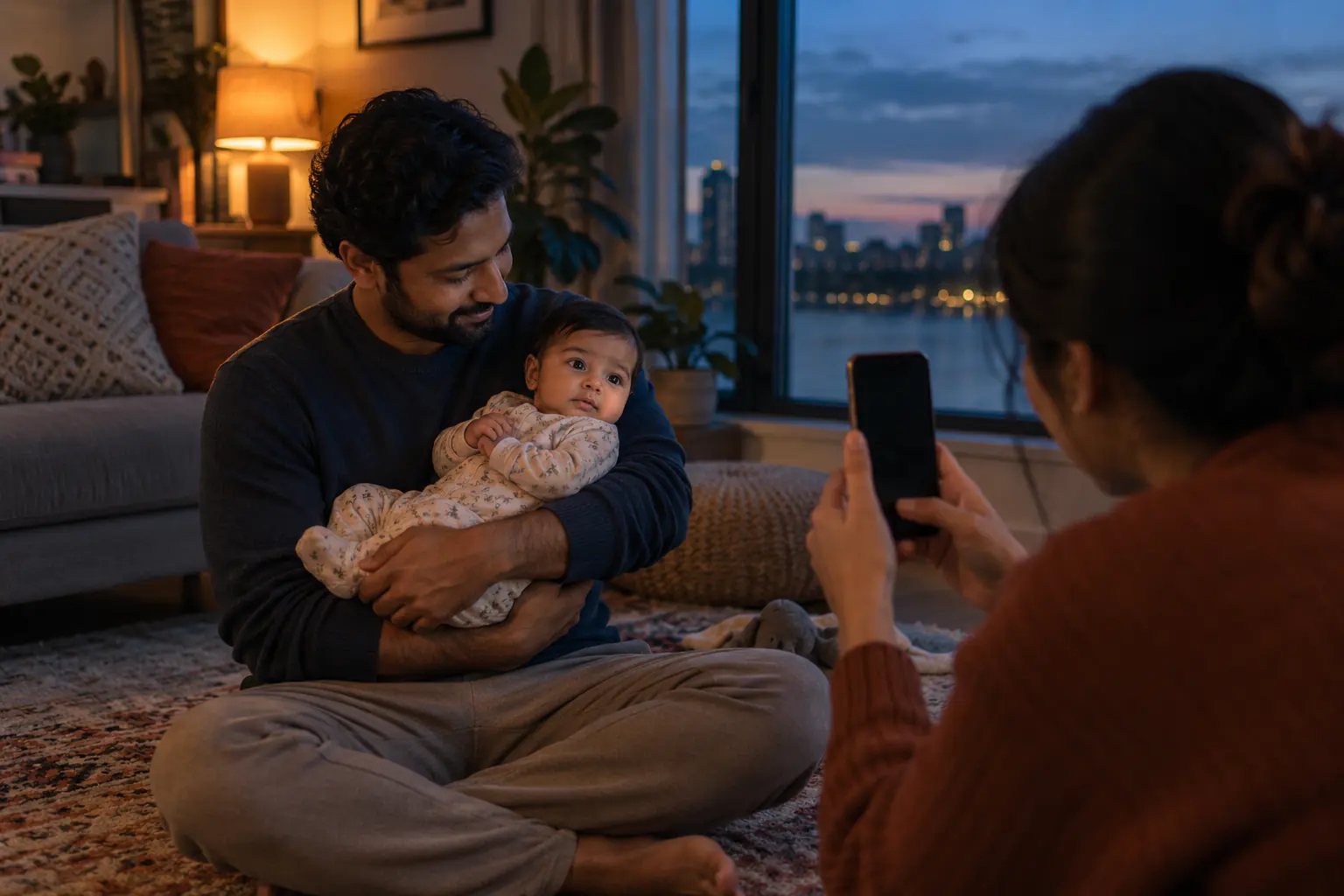
Start with the room. A shaded lamp placed a few feet to the side of the parent gives the face shape; a lamp directly behind the phone gives a flat result. Keep bulbs, cords and the lamp itself outside the baby's reach. If dusk is still visible through a window, turn the baby about 45 degrees toward it and let the lamp fill the darker side.
Avoid mixing every light in the room. One cool window, a warm lamp and greenish overhead LEDs can produce skin tones that no slider fixes cleanly. Turn off the overheads first. If the face is too dark, bring the shaded lamp closer to the adult holding the baby, not closer to the baby's face.
This is a photographic preference, not a medical claim about camera flash. Direct phone flash often looks harsh, produces small bright highlights and can interrupt a calm moment, so this guide focuses on better-looking available light. It does not claim that an ordinary camera flash damages a baby's eyes.
Use the 1× camera and clean the lens
Wipe the camera glass with a clean microfiber cloth. A faint fingerprint turns every lamp into a haze, which looks much worse at night. Stay on the 1× Main camera unless your particular iPhone clearly shows another lens performing better. Digital zoom magnifies noise and hand movement, so walk a little closer instead of pinching to 2.7×.
Give yourself more room around the subject than the final crop needs. Stabilization and small perspective corrections are easier when a foot or elbow is not already touching the edge of the frame.
Tap the face, then protect the highlights
Apple's current iPhone camera guide says the camera sets focus and exposure automatically. You can tap the area that should be sharp and drag the exposure control beside the focus box up or down. Touch and hold until AE/AF Lock appears when you want focus and exposure to stay put for several pictures.
Tap the nearer eye or cheek, then drag the small sun control down a little if the forehead or white onesie looks washed out. Do not brighten until the room resembles noon. A believable evening photo can have dark corners; the face only needs enough detail to read clearly.
How to use Night mode for a baby photo
On supported iPhones, Night mode appears automatically when the camera detects low light. Apple's Night mode instructions recommend holding the phone steady until the capture completes, or placing it on a solid, secure surface. The number beside the Night mode icon shows the capture time.
- Settle the baby in an ordinary secure hold or safe back-lying position.
- Brace both elbows against your body, a wall or a stable piece of furniture that is nowhere near the baby.
- Tap the face and watch the Night mode timer.
- Press the shutter during the brief pause between movements.
- Hold the phone in place until the countdown finishes.
Do not choose the longest possible exposure merely because it is available. A longer capture can reveal a still room beautifully and turn a moving hand into a translucent blur. If the baby's face keeps moving, shorten the capture, add more light or switch methods.
Night mode, Live Photos and Burst are different tools
Apple notes that Live Photos and flash are not active while Night mode is active; turning either on disables Night mode. That is not a problem. It simply means you have to decide whether the scene needs more light-gathering time or more chances to catch motion.
For tiny expressions, use Live Photos
A Live Photo records the moments immediately around the shutter press. Afterward, you can open the image, tap Edit, choose the Live Photo control and move through the frames to select a new key photo. Apple documents the exact steps in its guide to taking and editing Live Photos. This works well for a yawn, a glance toward a parent or the half-second between two expressions.
For repeated motion, use Burst
Apple's Burst mode guide explains how to swipe the shutter to the left, or enable the volume-up button for Burst. Use it when the baby is kicking, waving or turning toward a voice. Cull immediately. Ten near-duplicates are useful during capture and exhausting in the photo library.
A five-frame evening shot list
Low light suits small stories. Instead of trying to build a studio set after dinner, photograph what the room already gives you:
- The window profile: a parent holds the baby and turns slightly toward the last blue light outside.
- The shoulder cuddle: focus on the baby's face above the parent's shoulder, with one dim lamp behind them.
- Hands at bedtime: photograph an adult fastening a sleepsuit, framed tightly enough that the clutter disappears.
- The feed-afterglow: after the feed is finished, capture the relaxed hold without showing private details.
- The wide room: one frame that includes the quiet lamp, evening window and the adult's secure hold.
Keep every setup floor-level or parent-held. Do not balance a phone, lamp or tripod above the baby, and do not move a sleeping baby onto a sofa or prop for the photograph.
Edit the noise, not the night
In Photos, start with a small lift to Brilliance or Shadows and a small reduction in Highlights. Add only enough noise reduction to calm color speckles; too much turns skin and hair into wax. If the face is motion-blurred, sharpening will create bright edges rather than real eyelashes. Keep the honest softness or choose another frame.
Our baby photo editing basics explain a simple five-adjustment order. For daytime technique, the broader iPhone newborn photography guide covers angles, Portrait mode and window positioning.
Can Totti rescue a dark iPhone photo?
Totti can use a clear source photo to generate a new studio, milestone or seasonal portrait. That can replace a distracting room and create a different lighting style. It is not a forensic deblurring tool. If the eyes, fingers or facial outline are missing in the source, a generated result may invent them.

Start with the sharpest quiet frame
Upload the photo in which the face is clearest, choose from more than 50 Totti templates, and compare the generated portrait with the source before exporting. Totti is free to download on iPhone with optional in-app purchases and supports HD export at 2048×2560.
Get Totti on the App StoreAt night, add enough light to freeze the moment, then let the photograph stay dark enough to feel like the evening it came from.
